Showcased in early January in India, HyperOS 3 is Xiaomi and POCO’s take on Android 16, bringing notable improvements, smoother animations, and boosted AI features across the board. Xiaomi has also focused on improving cross-device connectivity and better integration with Apple devices in this update. While the firmware has already rolled out to several Xiaomi and POCO smartphones and tablets, the update is still underway for a few devices.
This guide provides all the details on the devices eligible for the update, their features, the process for downloading and installing the update, and more.
Which Xiaomi and POCO phones are eligible for HyperOS 3 update?
At the time of drafting this guide, most Xiaomi and POCO smartphones and tablets across price ranges have bagged the HyperOS 3 update, based on Android 16. Below is the month-by-month list of devices set to receive HyperOS 3.
Xiaomi
| Series | Models |
|---|---|
| Flagship series |
|
| Redmi Note series |
|
| Redmi number series |
|
| Pad (tablet) series |
|
| Wearables | Oct-Nov 2025: Xiaomi Watch S4 41mm, Xiaomi Smart Band 10 Glimmer Edition, Xiaomi Smart Band 10 Ceramic Edition, Xiaomi Smart Band 10 |
POCO
| Series | Models |
|---|---|
| F series |
|
| X series |
|
| M series |
|
| C series |
|
| Tablets | Dec 2025 – March 2026: POCO Pad |
Xiaomi and POCO phones currently running on HyperOS 3
Here’s a list of Xiaomi and POCO phones that have received the HyperOS 3 update over the past few months. If your device is listed below but hasn’t received the HyperOS 3 update yet, we recommend waiting patiently. HyperOS and Android updates, in general, are rolled out in phases.
Xiaomi
| Series | Models |
|---|---|
| Flagship series | Xiaomi 17, Xiaomi 17 Pro, Xiaomi 17 Pro Max, Xiaomi 17 Ultra, Xiaomi 15 Ultra, Xiaomi 15 Pro, Xiaomi 15, Xiaomi 15T Pro, Xiaomi 15T, Xiaomi MIX Flip, Xiaomi 14 Ultra, Xiaomi 14 Pro, Xiaomi 14, Xiaomi 14T Pro, Xiaomi 14T, Xiaomi 13 Ultra, Xiaomi 13 Pro, Xiaomi 13, Xiaomi 12 Pro, Xiaomi 12, Xiaomi 14 Civi |
| Redmi Note series | Redmi Note 14 Pro+, Note 14 Pro 5G, Note 14 Pro, Note 14, Note 14 5G, Redmi Note 13 Pro+, Redmi Note 13 Pro, |
| Redmi number series | Redmi 15C, Redmi A4 |
| Pad (tablet) series | Xiaomi Pad 8, Xiaomi Pad 7 Pro, Xiaomi Pad 7, Xiaomi Pad Mini, Xiaomi Pad 6S Pro 12.4, Redmi Pad 2, Redmi Pad 2 5G, Redmi Pad 2 Pro 5G, Redmi Pad SE |
| Wearables | Xiaomi Watch S4 41mm, Xiaomi Smart Band 10 Glimmer Edition, Xiaomi Smart Band 10 Ceramic Edition, Xiaomi Smart Band 10 |
POCO
| Series | Models |
|---|---|
| F series | POCO F7 Ultra, POCO F7 Pro, POCO F7, POCO F6 Pro, POCO F6, POCO F5 |
| X series | POCO X7 Pro, POCO X7 Pro Iron Man Edition, POCO X7, POCO X6 Pro |
| M series | POCO M8, POCO M6 Pro, POCO M7 Pro, POCO M7 |
| C series | POCO C75, POCO C85 |
| Tablets | POCO Pad M1 |
How to check your current HyperOS version or firmware
In case you’re unsure which HyperOS firmware you’re on, or want to confirm whether your device already runs HyperOS 3, here’s how you can check it:
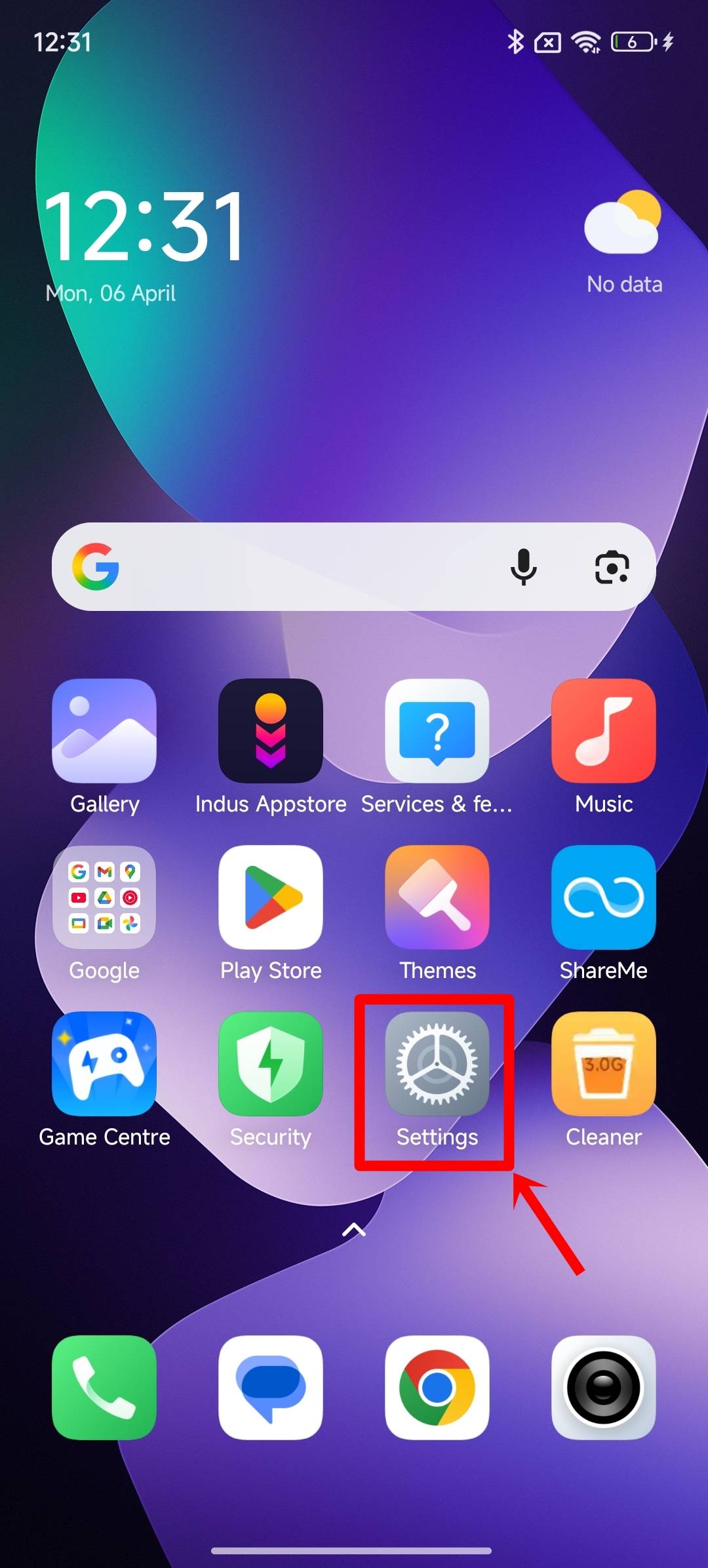
Step 1: Firstly, open the Settings app on your Xiaomi or POCO smartphone
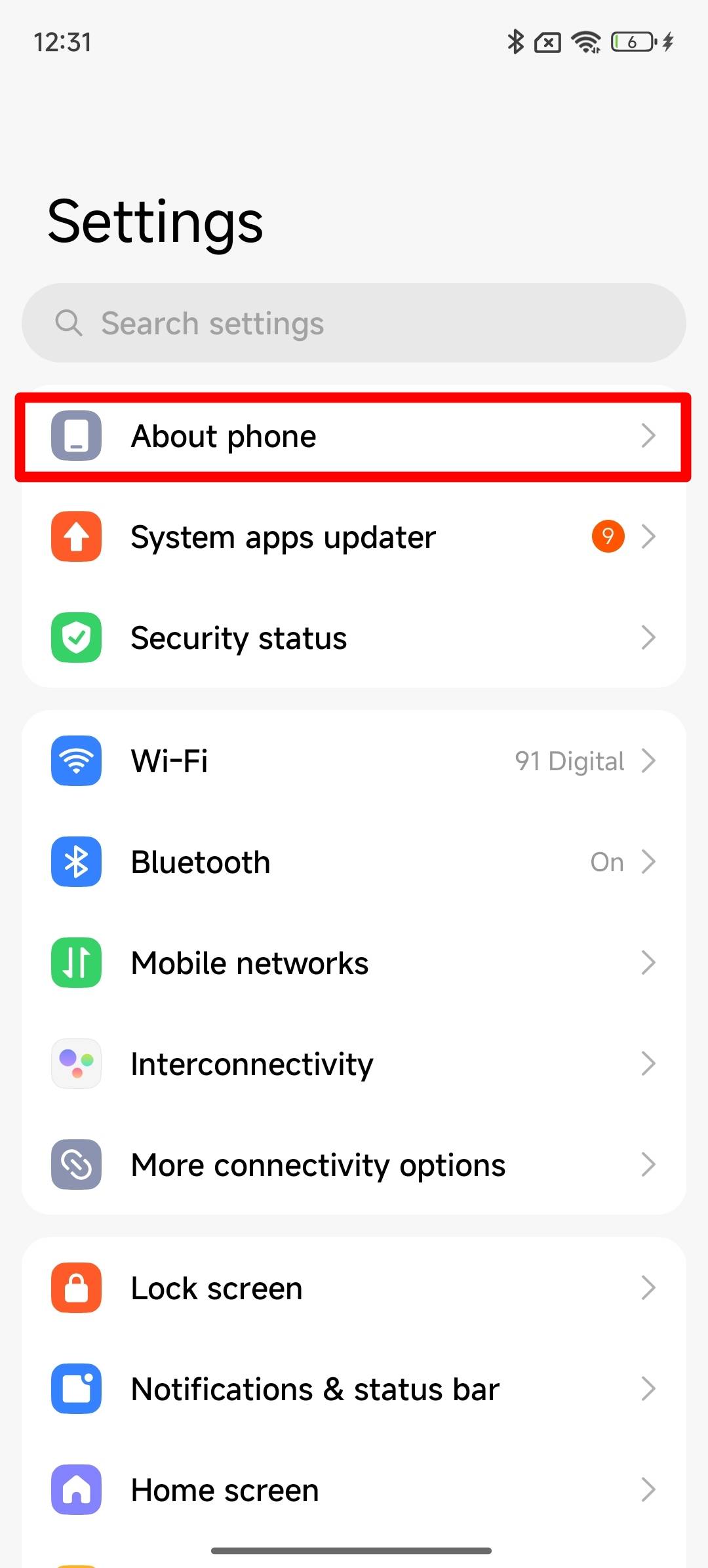
Step 2: Select the ‘About phone‘ option present up top
Step 3: On the next screen, you’ll be able to view the exact HyperOS firmware your phone is running
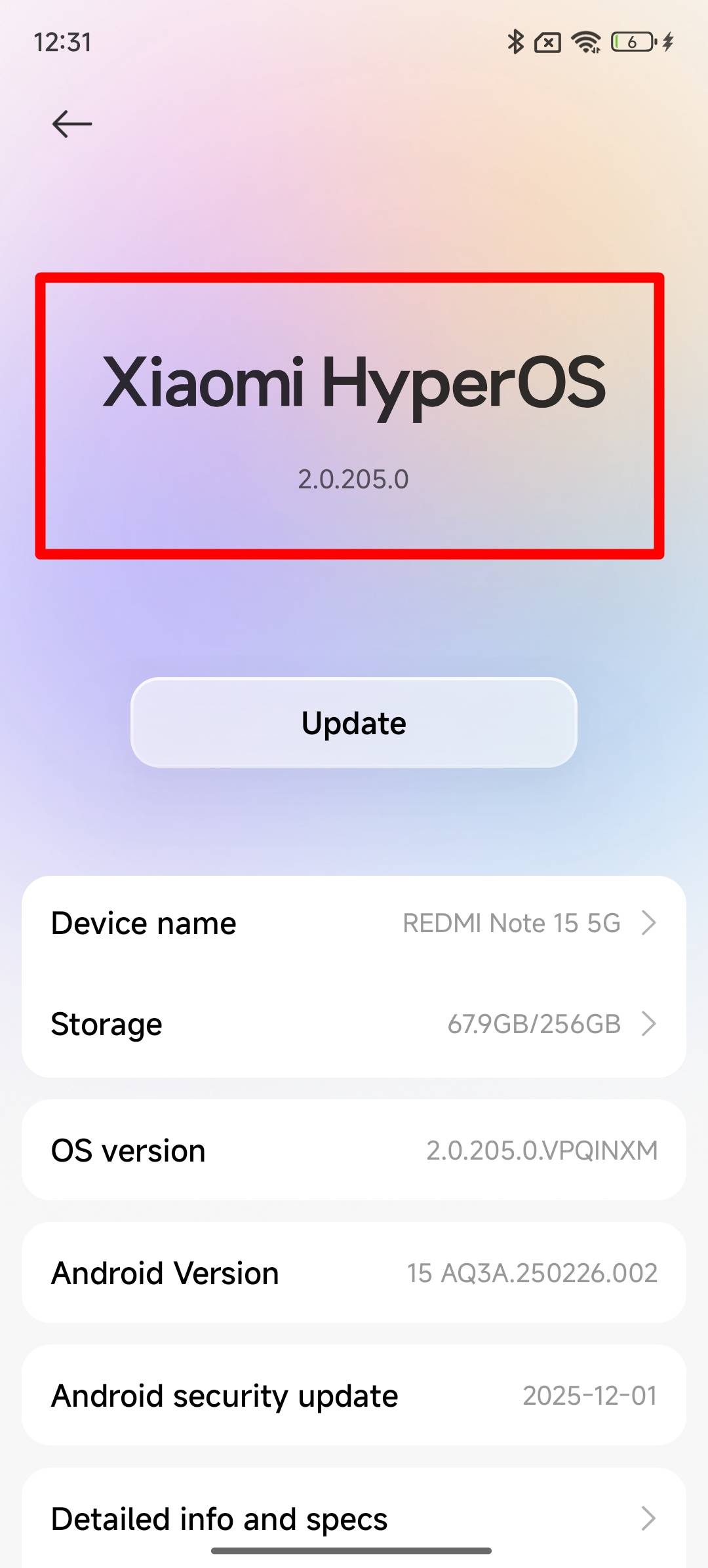
If it mentions a firmware version on the lines of 2.0.xxxx, this indicates your Xiaomi phone is currently on HyperOS 2, while a 3.0.xxxx version indicates HyperOS 3.
How to update a Xiaomi or POCO phone to HyperOS 3
Once your eligible Xiaomi or POCO phone has received the HyperOS 3 update, here’s how you can go about updating to the latest HyperOS release:
Step 1: Open the Settings app
Step 2: Now select the ‘About phone‘ section
Step 3: Then, tap on the HyperOS version text
Step 4: If the update is available, the page will lay out the entire changelog
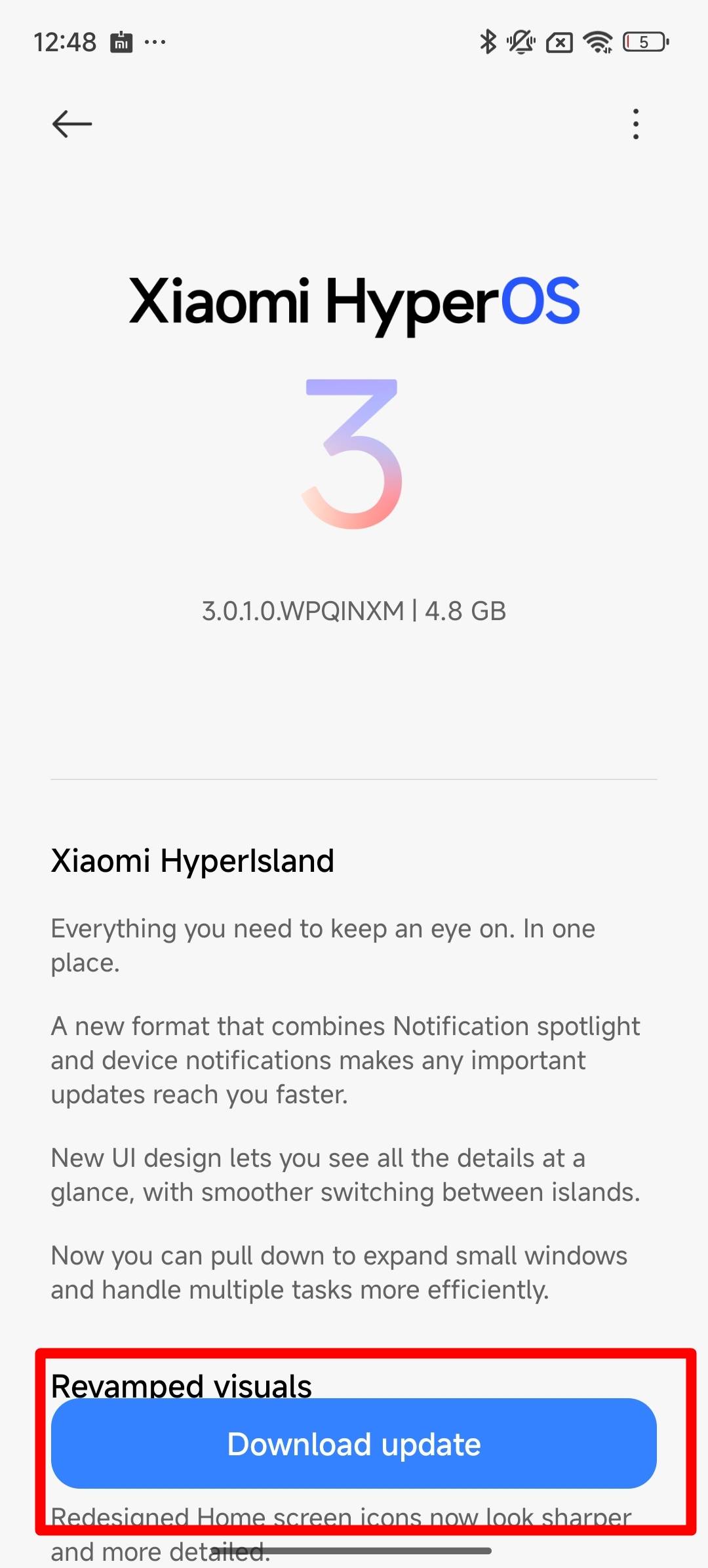
Step 5: Now, tap the ‘Download update‘ button to initiate the download
It can take several minutes to download the update, depending on its size and your internet connection speed. Once downloaded, the device will take a few more minutes to install the update in the background.
Top features and improvements worth checking on HyperOS 3
With HyperOS 3 rolled out to most flagship, midrange, and budget-tier Xiaomi and POCO devices, it brings a handful of new features and also boasts iterative upgrades in several areas:
HyperIsland: One of the biggest additions on HyperOS 3, a pill-shaped area at the top that expands to show live activities like music playback, timers, delivery status, and ride-hailing updates.
HyperAI upgrades: The AI Cinematic lockscreen feature turns any depth wallpaper into motion, while AI Writing has been deeply integrated system-wide to help rewrite text, change tone, or summarise long recordings and documents. The “Glare Removal” to eliminate lens flares or reflections on skin and glasses.
Cross-ecosystem connectivity: HyperOS 3 devices can be linked with iPhones, iPads, and MacBooks for seamless file transfers. Similarly, the universal search allows you to find files, images, and messages across all your connected devices
Design and animation refinements: The Control Centre has been tweaked to display more colours, while the transitions and animations across the system have been further refined.
Updated status bar icons: The status bar icons on HyperOS 3 have received a subtle redesign, making them appear bolder and bigger for better readability.
New homescreen icons: The homescreen icons have also received a fresh coat of paint, offering more depth and improved designs.
New wallpapers: The update also adds a slew of new wallpapers to the “Classic” section for older phones. Just like existing wallpaper packs, users can add different clock styles to these wallpapers according to their preferences.
How does HyperOS 3 improve the overall software experience?
In our Xiaomi 17 Ultra review, we noted that HyperOS 3, which runs on the phone out of the box, was impressively fast and fluid to operate. From opening and closing apps to quickly switching between them, the experience was seamless, resulting in a polished, premium software experience. The HyperIsland works as intended by displaying real-time information from apps like Spotify and Clock on the status bar.
As for midrange devices, while the Redmi Note 15 running on HyperOS 2 offered a fluid experience for the price at launch, the HyperOS 3 firmware further improves things by making the animations and transitions smoother and refined. Though the phone still misses out on visually appealing elements, such as blur effects, found on high-end Xiaomi and POCO phones.
Apart from that, we also tried out the recently released Xiaomi Pad 8 (review), on which HyperOS 3 ran equally well. The UI was not only optimised for a large screen but also offered features such as floating windows and multitasking capabilities, including Workstation mode, which enables a macOS-style interface with app icons appearing on the dock at the bottom.
On the downside, HyperOS 3 once again misses out on lockscreen widgets, which ColorOS 16 and OriginOS 6 have built on heavily, while customisation options in certain areas, such as the Quick Settings panel, remain lacking. Speaking of which, HyperOS 3 does add AI wallpapers, which animate any given static image.
FAQs
Will HyperOS 3 improve battery life and performance?
While Xiaomi claims HyperOS can deliver up to 30 percent better overall performance, faster app launches, and smarter AI-based battery management, real-world results may vary depending on the device and usage.
Will updating to HyperOS 3 wipe my data?
Normal OTA updates usually do not wipe data. However, it is strongly recommended to back up all your important data before updating to be on the safe side.
How do I report bugs in HyperOS 3?
In case you find any difficulties in using certain functions after updating to HyperOS 3, you can use the built-in Feedback app (or Feedback and Services) in HyperOS to directly submit bug reports to Xiaomi.
My phone is lagging after the update. What should I do?
After a major OS jump, such as HyperOS 3, it is normal for the system to process new files in the background, which can cause performance drops, heat, and battery drainage for a couple of days. Things usually get back to normal once everything’s settled in the background.
Can I downgrade from HyperOS 3 to HyperOS 2?
Downgrading is difficult and usually requires an unlocked bootloader, which wipes all your data and may void your warranty. It is generally recommended to wait for a “hotfix” update instead.
Which Android version is HyperOS 3 based on?
Xiaomi has built the latest version of its custom operating system on top of Android 16 for most of its recent flagship and upper mid-range devices, such as the Xiaomi 15 series and select 2025 models. However, for some older or select mid-range devices, Xiaomi has released a lighter version of HyperOS 3 based on Android 15 that retains most of the new HyperOS 3 features and design changes.